What is ClearLedger?
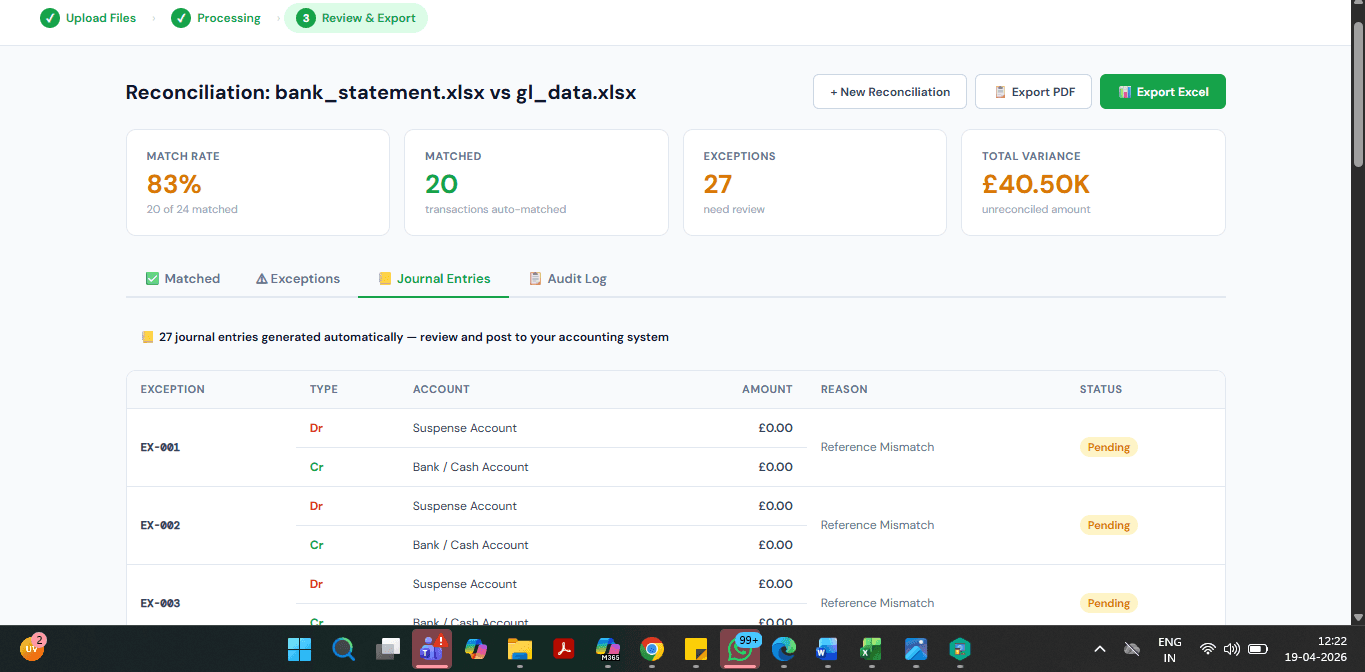
ClearLedger is an AI bank reconciliation tool that automatically matches bank statement transactions against general ledger exports for finance teams, accountants, and small businesses. Users upload two files — a bank statement and a GL export in any format from any bank or accounting system — and receive a fully reconciled output in under 60 seconds. The tool applies both exact and fuzzy matching logic to pair transactions, then flags every unmatched item with a specific reason rather than leaving exceptions unexplained. For each unmatched transaction, ClearLedger automatically generates a journal entry, saving finance teams the manual work of drafting adjustments. Results are exported as a five-tab Excel workbook and a PDF report formatted for auditors, with a full audit trail included. All processing runs client-side in the browser, so financial data never leaves the user's machine — a meaningful advantage for teams with data-residency or confidentiality requirements. No ERP, IT setup, or dedicated accounting software integration is required; the tool is designed to work with whatever file format a user already has. ClearLedger offers a free first reconciliation with no sign-up needed, making it straightforward to evaluate without a commitment. Paid tiers are available for teams needing ongoing monthly reconciliations at volume. The tool targets finance departments that currently spend three to five days per month on manual bank-to-GL reconciliation and want to reduce that process to minutes without replacing their existing systems.
What is ClearLedger used for?
Finance teams and accountants use ClearLedger to automate monthly bank-to-GL reconciliation without an ERP, reducing a multi-day manual process to under 60 seconds.
How much does ClearLedger cost?
Paid
Pro (Unlimited): $59+/month — unlimited reconciliations, unlimited file size
Pros and cons
Pros
- Exact and fuzzy transaction matching handles format variations across banks and accounting systems
- Every unmatched exception is flagged with a specific reason, not just flagged as missing
- Automatically generates journal entries for each unmatched item
- Exports a five-tab Excel workbook plus auditor-ready PDF with a full audit trail
- All processing is client-side — financial data never leaves the browser
Cons
- Delivered via Gumroad licence key, so there is no persistent dashboard or cloud storage for past reconciliations
- Free tier is limited to one reconciliation with no sign-up, meaning ongoing use requires a paid plan
- No direct integration with accounting systems — relies entirely on manual file uploads
Questions about ClearLedger
What is ClearLedger used for?
ClearLedger is used by finance teams and accountants to reconcile bank statements against general ledger exports. Users upload both files in any format and the tool uses AI matching to pair transactions, flag exceptions with reasons, and generate journal entries in under 60 seconds.
Is ClearLedger free?
ClearLedger offers one free reconciliation with no sign-up required. Paid plans start at $25 per month for five reconciliations (Startup) and $59 per month for unlimited reconciliations (Pro).
How does ClearLedger compare to BlackLine or ReconArt?
ClearLedger is a lightweight, browser-based tool that requires no ERP integration or IT setup, whereas platforms like BlackLine and ReconArt are enterprise-grade systems requiring implementation, onboarding, and ongoing IT management. ClearLedger is suited to small finance teams that need fast reconciliation without a full software deployment.
Is my financial data safe with ClearLedger?
Yes. ClearLedger processes all data client-side in the browser, meaning your bank statements and GL exports never leave your machine or get sent to a server.
What file formats does ClearLedger support?
ClearLedger accepts any format from any bank or accounting system, so users do not need to convert or reformat files before uploading.
What are the best alternatives to ClearLedger?
Reviews
Sign in to rate and review ClearLedger.
Sign in to reviewNo reviews yet. Be the first to review ClearLedger!